
Blockout - Counter-Strike 2
The goal was to design a new level for a pre-existing shooter game.
I choose Counter-Strike 2.

The Process
The analysis
Bomb Defusal map
To create a level that could fit into Counter-Strike 2, I had to first choose the game mode I wanted to focus on, for which I chose the Bomb defusal map, and then study its level design.
Popular Maps
I wanted to know more about how the popular maps, such as Dust and Inferno, were structured, so I played the game with a more critical focus and made sketches of the levels after playing. After that, I compared my drawings with the actual level layouts of those maps and analysed their structure.
Line Layout

After the analysis, I started planning the level.
Theme Selection
First, I decided on the theme for the level: an industrial setting, taking place in a lab or research facility.
Line Layout
Secondly, I sketched a Line Layout on paper to have a rough overview of the map flow, chokepoints, and objectives. I wanted the players to always have options and different paths to take, allowing for different ways to access certain areas and strategic decision-making.
Spawn points & Bomb Sites
I placed the T (Terrorist) and CT (Counter-Terrorists) spawn points on opposite sides of the map, and the Bomb Sites (A and B) closer to the CT spawn point (one to the left and one to the right of it).
The decision to make the bomb sites closer to the CT spawn point was due to the analysis of existing maps. The CT must arrive at the chokepoints a few seconds earlier to defend them, but not enough to give an advantage to either side.
2D Level Layout
Once inside Photoshop, I started the process of creating the 2D level layout, a top-down view of the level.
Metrics and Verticality
I based my metrics on the player's height and their size while crouched to figure out the level's elevation. To allow for different playstyles, I gave the level a variety of heights, from close-quarter battle areas to sniper alleys that players can use to their advantage.
Cover
I planned where the covers would be placed, taking into account the type of cover (hard, soft, low).
I gave priority to low cover, compared to hard cover, to allow for a less static gameplay, forcing players to be constantly on the move, crouching and shooting.
In areas where the player was already at an advantage due to positioning (for example, because of being on higher ground), I placed a soft cover to give a risk/reward situation where going there might be good, but dangerous.
Balance
-
Ensure that both teams have equal opportunities to play effectively and achieve their objectives.
-
Caters to various playing styles (sniping, close quarter battles, stealth) - Does the map support various playing styles? Which areas are sniper alleys and which areas are for close quarter combat?
Chokepoints
Design areas where the attacking team must break through, creating strategic engagements and balancing the game.
.png)
Whiteboxing
Once in Unreal Engine, I could finally test the metrics and iterate on the design.
Line of sight
sightlines
Landmarking
landmarks
-
Mass and Void
-
Leading lines
-
Create "callout zones" that will later help with communication ("long," "connector," "catwalk").
Below you can see the run-through of my blockout, step by step:
Counter-Terrorists Spawn Point

Terrorists Spawn Point

Bomb Site B
Bomb Site A
Bomb Site B
Choices of paths to choose

Entrance to Chokepoint

Chokepoint


Path to bomb site B

Choice between 2 paths

Path 1
Path 2
Path 1 - Chokepoint
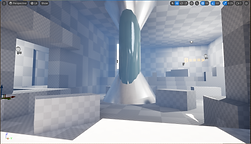

Path 2 - Vantage Point


Paths to bomb site B

Path 1
Path 2

Path 3
Path 1 - Direct acess to Bomb site

Path 2 - Upper Access


Path 3 - Lower Access


Path 4 - Ambush Spot


Choice of entrance to Bomb site B

1- Main Entrace


2- Side Entrace


Bomb Site A